
Passenger’s switches
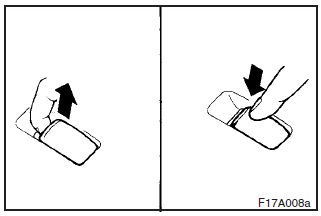
The passenger’s switches can be used to operate the corresponding passenger’s door windows.
Press the switch down to open the window, and pull up the switch to close it.
If the switch is fully pressed down/pulled up, the door window automatically opens/closes completely.
If you want to stop the window movement, operate the switch lightly in the reverse direction (pull up when moving downward, and press down when moving upward).
NOTE
(1) The door windows can be opened or closed even after the ignition switch is turned off for a 30–second period. If the driver’s door is opened during this period, the door window can be opened or closed for another 30 seconds. However, once the driver’s door is closed, the windows cannot be operated any more.
(2) The rear door windows only open halfway.
See also:
Front fog lamp switch
The front fog lamps can be operated while the headlamps or tail lamps are on.
Turn the knob in the “ON” direction to turn on the front fog lamps. An indication
lamp in the instrument cluster w ...
Lamps (headlamps, fog lamp, etc.) auto- cutout function
► If, while the lamp switch is in the “ ” position, the ignition switch is turned
to the “LOCK” position or “ACC” position, or the key is removed from the ignition
switch, the la ...
How to use the rear-view camera
When you place the gearshift lever or the selector lever in the “R” position
with the ignition switch in the “ON” position, the view behind the vehicle will
automatically appear on the scr ...