
Vehicle labeling
Vehicle identification number
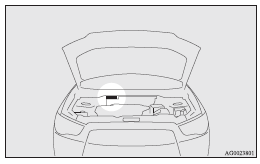
The vehicle identification number is stamped on the bulkhead as shown in the illustration.
Vehicle information code plate
The vehicle information code plate is riveted as shown in the illustration.
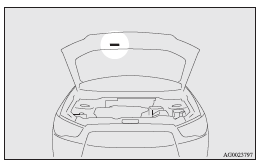
The plate shows model code, engine model, transmission model and body colour code, etc.
Please use this number when ordering replacement parts.
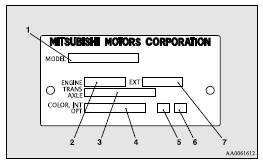
1- Model code
2- Engine model code
3- Transmission model code
4- Body colour code
5- Interior code
6- Option code
7- Exterior code
Vehicle identification number plate (RHD vehicles only)
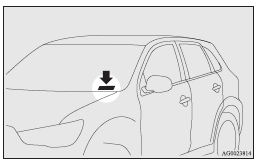
The vehicle identification number is stamped on the plate riveted to the left front corner of the vehicle body. It is visible from outside of the vehicle through the windscreen.
Engine number
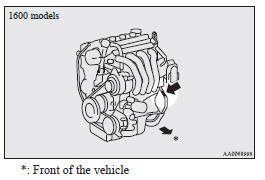
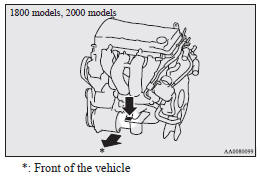
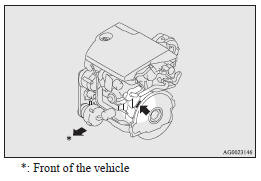
The engine number is stamped on the engine cylinder block as shown in the illustrations.
Petrol-powered vehicles
Diesel-powered vehicles
See also:
Starting
Tips for starting
► Do not operate the starter motor continuously longer than 10 seconds; doing
so could run down the battery. If the engine does not start, turn the ignition switch
back to ...
Licence plate lamps
1. Remove while pressing the lamp unit (A) to the left side.
2. Insert a minus screwdriver with the end covered with a cloth or other object
to press the hook (B) aside and remove the lens.
3. ...
Passenger’s switches
The passenger’s switches can be used to operate the corresponding passenger’s
door windows.
Press the switch down to open the window, and pull up the switch to close it.
If the switch is ful ...