
Ventilators
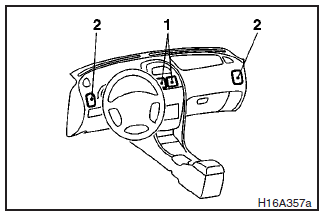
1- Centre ventilators
2- Side ventilators
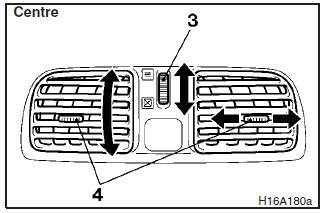
Air flow and direction adjustments
3- Ventilator dial
4- Knob
 – Open
 – Close
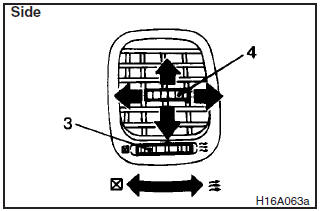
Set the ventilator dial (3) to the open position. Air always flows out from the ventilator when the blower is switched on.
Adjust the direction of the air flow by moving the knob (4), and horizontal and vertical adjustment can be made.
NOTE
On an air conditioned vehicle, the cool air from the ventilators may appear as a mist. This is due to moist air being suddenly cooled by the air conditioning. This will clear after a few moments.
See also:
Speaker enrollment function
The Bluetooth® 2.0 interface can use the speaker enrollment function to create
a voice model for one person per language.
This makes it easier for the Bluetooth® 2.0 interface to recognise voice ...
Brake assist system
The brake assist system is a device assisting drivers who cannot depress the
brake pedal firmly when it is necessary to do so (such as in emergency stop situations)
and provides greater braking fo ...
If the keyless operation key is not operating properly
Insert the keyless operation key into the key slot in the glove box. Starting
the engine and changing the operation mode should now be possible.
Remove the keyless operation key from the key slot a ...