
Licence plate lamps
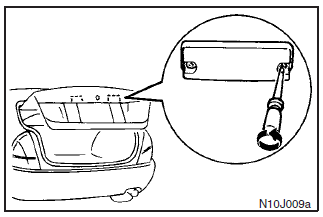
Remove the lens mounting screws, remove the lens, then remove the bulb by pulling out.
See also:
Petrol-powered vehicles with turbocharge
► Select engine oil of the proper SAE viscosity number according to the atmospheric
temperature.
SAE 5W-30, 0W-30 and 0W-40 engine oil can only be used if it meets ACEA A3/B3,
A3/B4 or A5 ...
Change of display mode (for vehicles with a MITSUBISHI genuine audio system)
Every time the “DISP” button is pressed lightly (less than 2 seconds), the display
can be changed.
Average fuel consumption Driving range Average speed
...
Operating a music player connected via Bluetooth®
For the operation of a music player connected via Bluetooth®, refer to “To play
tracks from a Bluetooth ® device”. ...