
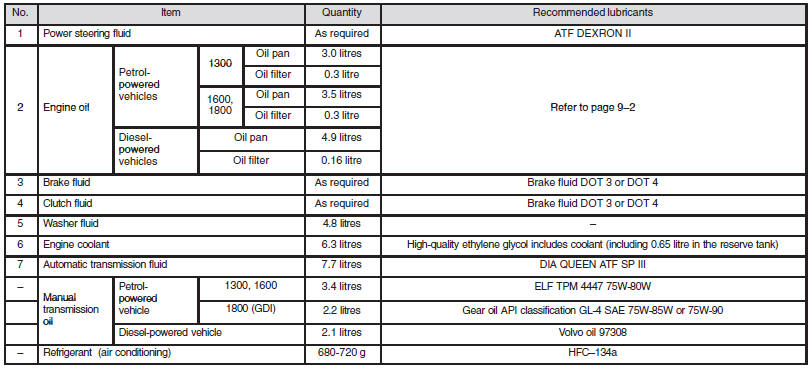
Capacities
See also:
Rear lid lamp
Remove the cover with a screwdriver. Turn the bulb socket anti-clockwise to remove
it. And remove the bulb from the socket by turning it anti-clockwise while pressing
it inward.
1- Reversing la ...
Control panel
A- Temperature control dial
B- Air selection switch
C- Blower speed selection dial
D- Air conditioning switch
E- Mode selection dial
F- Rear window demister switch
Note
► There is an i ...
To listen to a CD
The CD can be loaded or ejected by pressing the LOAD button (5) or the eject
button (15) even if the audio system power is off.
1. Press the PWR switch (3) to turn the audio system ON and OFF. The ...