
Charge warning display
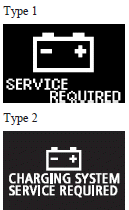
If there is a fault with the charging system, the warning display is displayed on the information screen in the multi-information display. The warning lamp in the instrument cluster also illuminates.
 Caution
► If the warning is displayed while the engine is running, immediately park your vehicle in a safe place and we recommend you to have it checked.
See also:
Operating the system as an automatic air conditioning
In normal conditions, use the system in the AUTO mode and follow these procedures:
1- Set the blower speed selection dial to “AUT” position.
2- Turn the temperature control dial to set the des ...
High-beam indication lamp
This indication lamp illuminates when the high-beam is used. ...
After driving on icy roads
After driving on snow or icy roads, remove any snow and ice which may have accumulated
around the wheels. On vehicles that have an ABS, be careful not to damage the wheel
speed sensors (A) or the ...