
Welcome light (for vehicles equipped with the keyless entry system or the keyless
operation system)
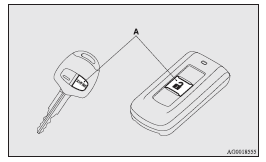
Except for vehicles for Russia, Kazakhstan and Ukraine, this function turns on the position and tail lamps for about 30 seconds after the UNLOCK switch (A) on the remote control transmitter is pressed when the combination headlamps and dipper switch is in the “OFF” or “AUTO” position (for vehicles equipped with the automatic lamp control).
On vehicles equipped with automatic lamp control, the welcome light function will operate only when it is dark outside the vehicle.
 Note
Note
► While the welcome light function is operating, perform one of the following
operations to cancel the function.
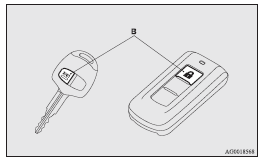
• Push the LOCK switch (B) on the remote control transmitter.
• Turn the combination headlamps and dipper switch to the
 position.
• Turn the ignition switch to the “ON” position.
► It is possible to modify functions as follows:
• Except for vehicles for Russia, Kazakhstan and Ukraine, deactivating the welcome
light function.
• Vehicles for Russia, Kazakhstan and Ukraine, activating the welcome light function.
• The headlamps can be set to come on in the low beam setting.
For further information, we recommend you to consult a MITSUBISHI MOTORS Authorized
Service Point.
On vehicles equipped with MITSUBISHI Multi-Communication System (MMCS), screen operations
can be used to make the adjustment. Refer to the separate owner’s manual for details.
See also:
Parking
To park the vehicle, first bring it to a complete stop, fully engage the parking
brake and then move the selector lever to the “P” (PARK) position.
If you are going to leave the vehicle unatten ...
Brake warning display
This warning is displayed if you drive with the parking brake still applied.
The warning lamp in the instrument cluster only illuminates when the parking brake
is applied.
Caution
► If ...
Central door locks
NOTE
• Each of the doors can be locked or unlocked independently by using the inside
lock knob.
• When locking or unlocking with the key on the driver’s door, only the driver’s
door wil ...