
Except for vehicles equipped with rain sensor
The windscreen wiper and washer can be operated with the ignition switch in the “ON” or “ACC” position.
If the blades are frozen to the windscreen, do not operate the wipers until the ice has melted and the blades are freed, otherwise the wiper motor may be damaged.
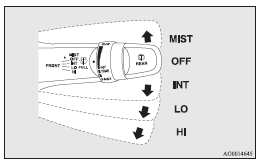
MIST- Misting function
The wipers will operate once.
OFF- Off
INT- Intermittent (Speed sensitive)
LO- Slow
HI- Fast
To adjust intermittent intervals
With the lever in the “INT” (speed-sensitive intermittent operation) position, the intermittent intervals can be adjusted by turning the knob (A).
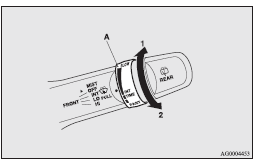
1- Fast
2- Slow
 Note
Note
► The speed-sensitive-operation function of the windscreen wipers can be deactivated.
For further information, we recommend you to consult a MITSUBISHI MOTORS Authorized
Service Point.
On vehicles equipped with MITSUBISHI Multi-Communication System (MMCS), screen operations
can be used to make the adjustment.
Refer to the separate owner’s manual for details.
Misting function
The misting function can be used when the ignition switch is in the “ON” or “ACC” position.
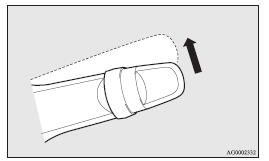
The wipers will operate once if the wiper lever is raised to the “MIST” position and released. This operation is useful when it is drizzling, etc. The wipers will continue to operate while the lever is held in the “MIST” position.
See also:
Installing a child restraint system to a 3–point type seat belt (with emergency
locking mechanism)
For safety, you are advised to install the child restraint system using a 3–point
type seat belt with emergency/automatic locking mechanism. If you cannot avoid installing
it using another typ ...
Change of air selection
Every time the air selection switch is pressed, alteration is made between outside
air introduction and inside air recirculation. When inside air is recirculated,
the indicator lamp (A) comes on ...
Phone book function
The Bluetooth® 2.0 interface has 2 types of unique phone books that are different
from the phone book stored in the cellular phone. They are the vehicle phone book
and the mobile phone book.
The ...