
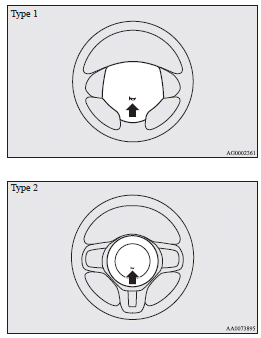
Horn switch
Press the steering wheel on or around the
 mark.
mark.
See also:
Hydraulic power steering system (HPS)
The hydraulic power steering system (HPS) uses a hydraulic pressure pump to assist
the turning of the steering wheel.
Caution
► Do not leave the steering wheel turned all the way in one dir ...
Anti–freeze
The engine coolant contains an ethylene glycol anti–corrosion agent. The cylinder
head and water pump housing are cast aluminium alloy, and periodic changing of the
engine coolant is necessary t ...
Replacing tyres and wheels
Caution
► Avoid using different size tyres from the one listed and the combined use
of different types of tyres, as this can affect driving safety.
Refer to “Tyres and wheels”.
► ...