
Starting the engine (petrol-powered vehicles)
[For vehicles equipped with keyless operation system]
For information on operations for vehicles equipped with the keyless operation system, refer to “Keyless operation system: Starting” on pages 1-16, 1-20.
[Except for vehicles equipped with keyless operation system]
The starting procedure is as follows: 1. Insert the ignition key and fasten the
seat belt.
2. Make sure the parking brake is applied.
3. Depress and hold the brake pedal.
4. Fully depress the clutch pedal (M/T).
 Note
Note
► On vehicles with the Auto Stop & Go (AS&G) system, the starter will not operate unless the clutch pedal is fully depressed (Clutch interlock).
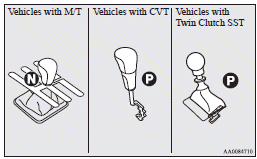
5. On vehicles equipped with M/T, place the gearshift lever in the “N” (Neutral) position.
On vehicles equipped with a CVT or Twin Clutch SST, make sure the selector lever (CVT) or gearshift lever (Twin Clutch SST) is in the “P” (PARK) position.
Note
► On vehicles equipped with a CVT, the starter will not operate unless the selector lever is in the “P” (PARK) or “N” (NEUTRAL) position.
On vehicles equipped with Twin Clutch SST, the starter will not operate unless the gearshift lever is in the “P” (PARK) position or the gearshift lever is in the “N” (NEUTRAL) position with the brake pedal depressed.
For safety reasons, start the engine in the “P” (PARK) position so that the wheels are locked.
6. After turning the ignition key to the “ON” position, make certain that all warning lamps are functioning properly before starting the engine.
7. Turn the ignition key to the “START” position without depressing the accelerator pedal, and release it when the engine starts.
Note
► Minor noises may be heard on engine startup.
These will disappear as the engine warms up.
Idling speed in high altitude area
At high altitude locations, the idling speed may be higher. This is done in order to stabilize the idling speed when the power steering system and other systems operate. It does not indicate a malfunction.
See also:
UKW/MW/LW electronic tuning radio with CD player*
The audio system can be used when the ignition switch is in the “ON” or “ACC”
position.
A– Display window B– Audio system
NOTE
(1) The MITSUBISHI Genuine CD autochanger can be conne ...
Error codes (USB memory device)
If an error code appears in the display, take action in accordance with the table
below.
...
Front passenger seat belt warning lamp
The front passenger seat belt warning lamp is located on the instrument panel.
The lamp comes on when a person sits on the front passenger seat but does not
fasten the seat belt. It goes off when ...