
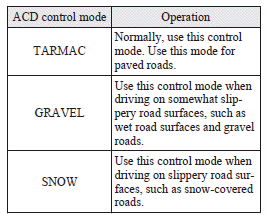
ACD control mode
Select the control mode from the following three types to suit the driving conditions.
See also:
Deployment of front airbags and driver's knee airbag
The front airbags and driver’s knee airbag ARE DESIGNED TO DEPLOY when…
The front airbags and driver’s knee airbag are designed to deploy when the vehicle
suffers a moderate to severe frontal ...
General maintenance
Fuel, engine coolant, oil and exhaust gas leakage
Look under the body of your vehicle to check for fuel, engine coolant, oil and
exhaust gas leaks.
WARNING
• If you see a suspicious fuel leak ...
Assist grip
These grips are to support the body by hand while seated in the vehicle.
Caution
► Do not use the assist grips when getting into or out of the vehicle.
The assist grips could detach and ca ...