
To deactivate
The set speed driving can be deactivated as follows: ► Press the “ON OFF” switch
(A). (Cruise control will be turned off.)
► Press the “CANCEL” switch (D).
► Depress the brake pedal.
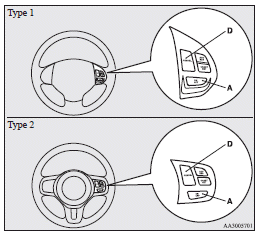
The set speed driving is deactivated automatically in any of the following ways.
► When you depress the clutch pedal (on vehicles with M/T).
► When your speed slows to about 15 km/h (9 mph) or more below the set speed because
of a hill, etc.
► When your speed slows to about 40 km/h (25 mph) or less.
► When the Twin Clutch SST control mode is set to “SPORT” mode (on vehicles equipped
with a Twin Clutch SST). Refer to “Twin Clutch SST control mode”.
► When the Active Stability Control (ASC) starts operating. (if so equipped) Refer
to “Active stability control (ASC)”.
 Warning
► On vehicles equipped with a CVT or Twin Clutch SST, although the set speed
driving will be deactivated when shifting to the “N” (NEUTRAL) position, never move
the selector lever (CVT) or the gearshift lever (Twin Clutch SST) to the “N” (NEUTRAL)
position while driving.
You would have no engine braking and could cause a serious accident.
Also, the set speed driving may be deactivated as follows: ► When the engine speed rises and approaches the tachometer's red zone (the red-coloured part of the tachometer dial).
 Caution
► When the set speed driving is deactivated automatically in any situation
other than those listed above, there may be a system malfunction.
Press the “ON-OFF” switch to turn off the cruise control and have your vehicle inspected
by a MITSUBISHI MOTORS Authorized Service Point.
See also:
Lamp monitor buzzer
[When the engine was started using the key] If the driver’s door is opened when
the key is in the “LOCK” or “ACC” position or removed from the ignition switch while
the lamps are on, a b ...
Overview
The all-new 2008 Mitsubishi Lancer was engineered from bumper to bumper to
provide a driven-to-thrill experience behind the wheel. Driving enthusiasts will
feel the difference through every curve, ...
Exterior
1. Electric window control
2. Fuel tank filler p. 03
3. Outside rear-view mirror
Side turn-signal lamps*
4. Side turn-signal lamps*
5. Position lamps
6. Headlamps, low beam
7. Front fog l ...