
The security alarm has four modes
System preparation mode (approx. 20 seconds)
(The buzzer sounds intermittently and the security indicator (A) blinks.)
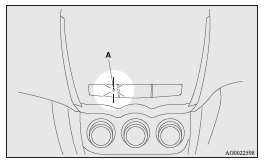
The system preparation time extends from the point at which all of the doors and the tailgate are locked by pressing the LOCK switch on the remote control switch or the keyless operation function to the point at which the system armed mode goes into effect.
During this time, it is possible to temporarily open a door or the tailgate without using the keyless entry system or the keyless operation function and without causing the alarm to sound (for example, when you forget something inside the vehicle or realize that a window is open).
System armed mode
(The security indicator continues to blink with the indicator’s reduced lit-up duration time.) Once the system preparation mode has ended, the system armed mode starts.
If an unlawful opening of any of the doors, tailgate or bonnet is detected during the system armed mode, the alarm will be activated to warn people around the vehicle of an abnormal condition.
Also, if unlawful moving of the vehicle is attempted or a vehicle intrusion is detected, the alarm will be activated.
Alarm activation
The turn-signal lamps blink and the siren sounds for approximately 30 seconds.
Refer to “Alarm activation”.
 NOTE
NOTE
• The alarm will resume if unlawful actions are taken again, even if the alarm has stopped.
System cancellation
It is possible to cancel the system activation during the system preparation mode or the system armed mode.
In addition, it is possible to cancel the alarm once it has been activated.
Refer to “Cancelling the system”, “Cancelling the alarm”.
NOTE
• When lending the vehicle to another person or allowing the vehicle to be driven by someone who is unfamiliar with the security alarm system, be sure to give the person a proper explanation of the security alarm system.
If a person who is unfamiliar with the security alarm system accidentally unlocked the vehicle, causing the alarm to sound, the alarm would be a nuisance to people nearby.
See also:
Braking
All the parts of the brake system are critical to safety.
We recommend you to have the vehicle checked at regular intervals according to
the service booklet.
Caution
► Avoid driving habits ...
Head restraints
WARNING
• Driving without the head restraints in place can cause you and your passengers
serious injury or death in an accident. To reduce the risk of injury in an accident,
always make sure t ...
Driver’s switches
The driver’s switches can be used to operate all door windows. A window can be
opened or closed by operating the corresponding switch.
Press the switch down to open the window, and pull up the sw ...