
Cooling (Vehicles with air conditioning)
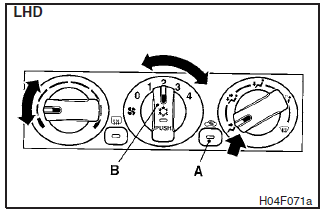
Set the mode selection dial to the “ ”
position.
”
position.
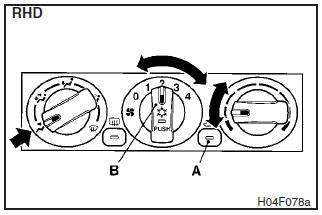
Set the air selection switch (A) to the outside position and push the air conditioning switch (B).
Adjust the temperature by turning the temperature control dial clockwise or anticlockwise. Select the desired blower speed.
NOTE
If the outside air is dusty or otherwise contaminated, or if high cooling
performance is desired, set air selection switch to the recirculation position and
the temperature control dial all the way to the left.
Switch to the outside position
periodically to increase ventilation so that the windows do not become fogged up.
CAUTION
When using the air conditioning, the idling speed may slightly increase as the air conditioning compressor is switched on/off automatically. Especially for vehicles with an automatic transmission, while the vehicle is stationary, fully depress the brake pedal to prevent the vehicle from creeping.
See also:
Possible driving speed
Avoid shifting down at high speed, as this may cause excessive engine speed (the
tachometer needle into the red zone) and damage the engine.
Petrol-powered vehicles without MIVEC engine
Use 5 th ...
Stopping the engine
1. Bring the vehicle to a complete stop.
2. Fully engage the parking brake while depressing the brake pedal.
3. For vehicles equipped with M/T, turn the ignition switch to the “LOCK” position
...
To remove
Remove the child restraint in accordance with the instructions provided by the
child restraint system’s manufacturer. ...