
Interior
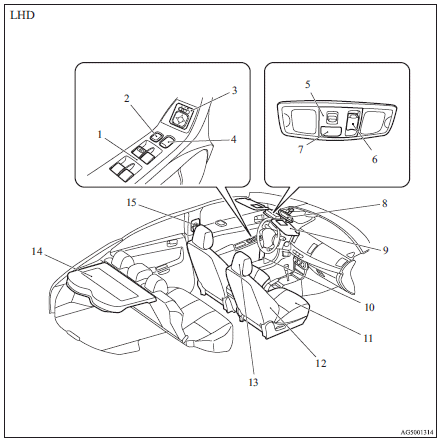
1. Electric window control switch
2. Lock switch
3. Electric remote-controlled outside rear-view mirrors switch
4. Central door lock switch
5. Front room & map lamps
6. Sunroof switch
7. Bluetooth® 2.0 interface
8. Inside rear-view mirror
9. Sun visors
Vanity mirror
Card holder
10. Bottle holder (for front seats)
11. Front seats
12. Supplemental restraint system - side airbag (for front seats)
13. Head restraints
14. Rear shelf panel
15. Adjustable seat belt anchor (front seats)
Seat belts
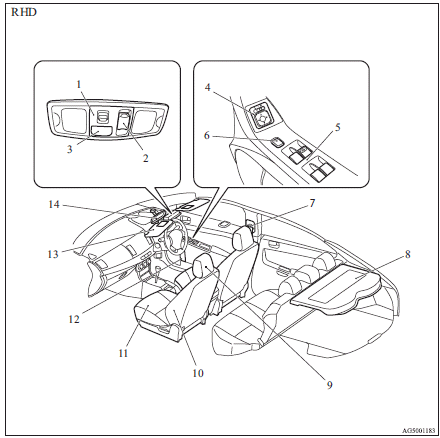
1. Front room & map lamps
2. Sunroof switch
3. Bluetooth® 2.0 interface
4. Electric remote-controlled outside rear-view mirrors switch
5. Electric window control switch
6. Lock switch
7. Adjustable seat belt anchor (front seats)
Seat belts
8. Rear shelf panel
9. Head restraints
10. Supplemental restraint system - side airbag (for front seats)
11. Front seats
12. Bottle holder (for front seats)
13. Sun visors
Vanity mirror
Card holder
14. Inside rear-view mirror
See also:
Reversing sensor system operation indication lamp
In case there is a malfunction in the reversing sensor system, the reversing
sensor system operation indication lamp will blink and the warning buzzer will sound
for approximately 5 seconds. Even ...
Genuine parts
MITSUBISHI MOTORS has gone to great lengths to bring you a superbly crafted automobile
offering the highest quality and dependability.
Use MITSUBISHI MOTORS Genuine Parts, designed and manufactured ...
Safe driving techniques
Driving safety and protection against injury cannot be fully ensured. However,
we recommend that you pay extra attention to the following:
(1) Before starting the vehicle, make sure that you and yo ...