
Type 1
The key fits all locks.
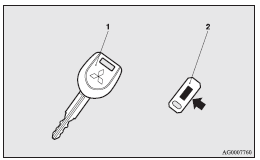
1- Electronic immobilizer key
2- Key number tag
See also:
Useful voice commands
Help function
The Bluetooth® 2.0 interface is equipped with a help function.
If you say “Help” when the system is waiting for a voice command input, the system
will tell you a list of the com ...
To deactivate
The auto–speed control can be deactivated by the following ways.
(1) Push the main switch at the end of the lever. (Main switch OFF) (2) Pull
the auto–speed control lever toward you.
The aut ...
Vehicle weight
Petrol-powered vehicles
NOTE
• Trailer specifications indicate the manufacturer’s recommendation.
NOTE
• Trailer specifications indicate the manufacturer’s recommendation.
Diesel-po ...