
Locking the doors and rear hatch
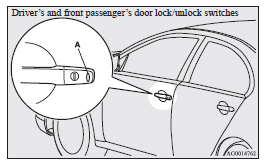
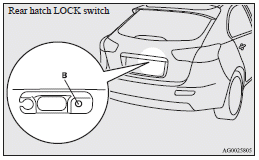
When you are carrying the keyless operation key, if you press the driver’s or front passenger’s door lock/unlock switch (A), or the rear hatch LOCK switch (B) within the operating range, the doors and the rear hatch are locked.
The turn-signal lamps will blink once.
Also refer to “Locking and unlocking: Doors, Central door locks, Rear hatch” on pages 1-26, 1-27 and 1-32.
 Note
Note
► For vehicles equipped with the mirror retractor switch, the outside rear-view mirrors automatically retract when all the doors and the rear hatch are locked using the keyless operation function.
Refer to “Starting and driving: Outside rearview mirrors”.
► With a vehicle that has a Dead Lock System, pressing the driver’s or front passenger’s door lock/unlock switch (A), or the rear hatch LOCK switch (B) two times in succession causes the Dead Lock System to be set.
(Refer to “Setting the system”.)
► The keyless operation function does not operate under the following conditions:
• The keyless operation key is
inside the vehicle.
• A door or the rear hatch is open or ajar.
• The ignition switch is not in the “LOCK” position.
• The emergency key is in the ignition switch.
► When checking if the vehicle is locked, press the rear hatch OPEN switch within about 3 seconds of locking the vehicle. If you wait longer than 3 seconds and press the rear hatch OPEN switch, the doors and rear hatch will be unlocked.
► The time allowed for checking that the vehicle is locked can be adjusted. For further information, please contact a MITSUBISHI MOTORS Authorized Service Point.
On vehicles equipped with MITSUBISHI Multi-Communication System (MMCS), screen operations can be used to make the adjustment.
Refer to the separate owner’s manual for details.
See also:
Vehicle performance
Petrol-powered vehicles
Diesel-powered vehicles
...
Indication lamps
Turn-signal indication lamps/ Hazard warning indication lamps
These indication lamps blink in the following situations.
• When the turn-signal lever is moved to activate a turn-signal lamp.
• ...
If the lamp illuminates while driving
(1) Since there will always be a possibility of the vehicle becoming unstable
when brakes are applied rapidly, ensure that brakes are applied gently and that
high– speed driving is not attempted ...