
Warning activation
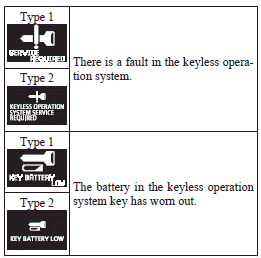
In order to prevent vehicle theft or the accidental operation of the keyless operation system, the buzzer and the display on the information screen in the multi- information display are used to alert the driver.
If a warning is activated, always check the vehicle and the keyless operation key. The warning is also displayed if there is a fault in the keyless operation system.
If any of the following warnings are activated, please contact a MITSUBISHI MOTORS Authorized Service Point.
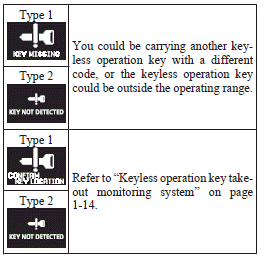
In the following cases, a warning is activated, but it can be cancelled if the correct actions are followed.
► The ID codes for the keyless operation key and vehicle do not match.
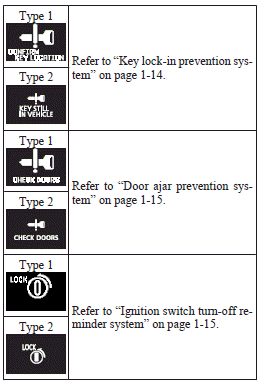
► Even though you press the driver’s or front passenger’s door lock/unlock switch, or the rear hatch LOCK switch, the doors and rear hatch are not locked.
See also:
Power type (driver’s side only)
Adjust the seatback angle by operating the switch as indicated by the arrows.
1- To move to forward direction
2- To recline rearward
Note
► To prevent the battery from running down, opera ...
If the vehicle breaks down
If the vehicle breaks down on the road, move it to the shoulder and turn on the
hazard warning flashers and set up a warning triangle, flashing lamp, etc.
Refer to “Hazard warning flasher switchâ ...
On a snow-covered or frozen
► When driving on a snow-covered or frozen road, it is recommended that you use
snow tyres or tyre chains. Refer to the “Snow tyres” and “Tyre chains” sections.
► Avoid high-spe ...