
UKW/MW/LW electronic tuning radio with tape player*
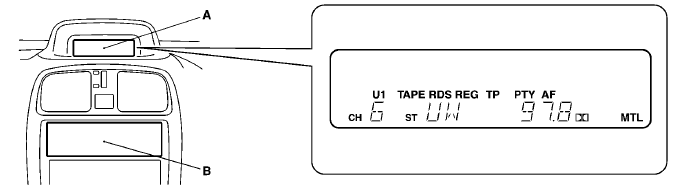
The audio system can be used when the ignition switch is in the “ON” or “ACC” position.
A– Display window
B– Audio system
NOTE
(1) The MITSUBISHI Genuine CD player or CD autochanger can be connected to
this audio system. The CD player or the CD autochanger can be operated by the switch
on the audio body. Refer to “Connection of a CD player or a CD autochanger” on page
6–13.
(2) To listen to the audio system while the engine is stopped, turn the
ignition key to the “ACC” position.
(3) When a cellular phone is used inside the
vehicle, noise may be produced from the audio equipment. This does not mean that
something is wrong with the audio equipment. In such a case, use the cellular phone
at a place as far as possible from the audio equipment.
(4) In the case of misuse
(entry of a foreign object or water, smoke or odor, etc.), immediately stop the
operation and have the audio system checked at an authorized MITSUBISHI dealer.
Never try to repair it by yourself. Avoid continuous usage without inspection by
a qualified person.
(5) The audio system’s control panel can be removed to deter
thieves. For details, refer to the section entitled “Audio system anti-theft feature”
on page 6–26.
See also:
Type 1 (Vehicles equipped with the central door lock switch)
Note
► Each of the doors can be locked or unlocked independently by using the inside
lock knob.
► When locking or unlocking with the key on the driver’s door, only the driver’s
...
Cargo floor boxes
The boxes for storing articles are located inside the luggage compartment.
To use the boxes, raise the lids (A).
...
Control panel
A- Temperature control dial
B- Air selection switch
C- Blower speed selection dial
D- Air conditioning switch
E- Mode selection dial
F- Rear window demister switch
Blower speed selection dial
...