
System preparation mode (approx. 20 seconds)
(The buzzer sounds intermittently and the security indicator (A) blinks.)
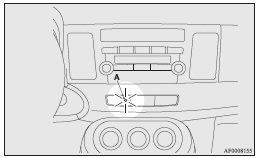
The system preparation time extends from the point at which all of the doors and rear hatch are locked by pressing the LOCK switch on the remote control switch or the keyless operation function to the point at which the system armed mode goes into effect.
During this time, it is possible to temporarily open a door or the rear hatch without using the keyless entry system or the keyless operation function and without causing the alarm to sound (for example, when you forget something inside the vehicle or realize that a window is open).
See also:
“ASC OFF” switch
The ASC is automatically activated when the ignition switch is turned to the
“ON” position. You can deactivate the system by pressing down the “ASC OFF” switch
for 3 seconds or longer.
Wh ...
Instruments
1- Fuel gauge 2- Speedometer 3- Tachometer* 4- Water temperature gauge
5- Tripmeter reset button 6- Tripmeter 7- Odometer
...
Fuse block location
To prevent damage to the electrical system due to shortcircuiting or overloading,
each individual circuit is provided with a fuse.
There are fuse blocks in the passenger compartment and in the engi ...