
Instruments
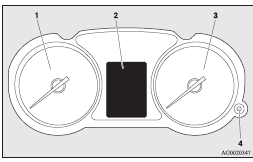
1- Tachometer ®
2- Multi-information display ®
Information screen display list ®
3- Speedometer (km or mph + km/h)
4- Daytime dipper button (meter illumination control) ®
See also:
Centre console box with lid
To open the box, tilt the armrest backward and raise the lid. (Refer to “Armrest”
on page 3–9.) ...
Engine overheating
When the engine is overheating, the information screen in the multi-information
display will be interrupted and the engine coolant temperature warning display will
appear. Also will blink.
If th ...
Steering wheel audio remote control switches
The remote control switch is located on the left side of the steering wheel.
It can be used when the ignition switch or the operation mode is in ON or ACC.
1- Volume up button
2- Volume down butt ...