
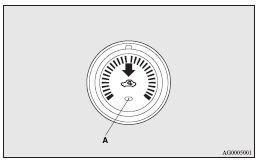
Air selection switch
To change the air selection, simply press the air selection switch.
A sound will be made every time you push the switch.
► Outside air: Indication lamp (A) is OFF Outside air is introduced into the
passenger compartment.
► Recirculated air: Indication lamp (A) is ON Air is recirculated inside the passenger
compartment.
 Caution
► Normally, use the outside position to keep the windscreen and side windows
clear and quickly remove fog or frost from the windscreen.
If the outside air is dusty or otherwise contaminated use the recirculation position.
Switch to the outside position periodically to increase ventilation so that the
windows do not become fogged up.
► Use of the recirculation position for extended time may cause the windows to fog
up.
 Note
Note
► When the heater operates with the selection switch in the outside position,
the system automatically determines whether to continue using outside air or to
perform recirculation.
If the outside air temperature is high, the system selects recirculation and causes
the indication lamp (A) in the switch to illuminate.
Press the selection switch to return to outside air introduction.
See also:
Vehicles with rain sensor
The windscreen wipers can be operated with the ignition switch in the “ON” or
“ACC” position.
If the blades are frozen to the windscreen, do not operate the wipers until the
ice has melte ...
Lancer + Outlander
The latest vehicle developed from MMC's "Project Global" mid-size platform,
Mitsubishi ASX aims at blending Lancer's passenger car on-road attitude with
Outlander's commanding driving po ...
Power steering fluid
Check the fluid level in the reservoir while the engine is idling.
Unscrew the reservoir cap; the level in this tank should be kept between the
“MAX” and “MIN” lines.
Use “ATF DEXRON I ...