
Operating the system in automatic mode
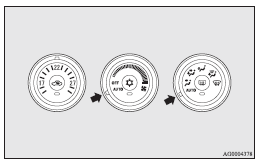
In normal conditions, use the system in the AUTO mode and follow these procedures:
1. Set the blower speed selection dial to the “AUTO” position.
2. Set the temperature control dial to the desired temperature.
3. Set the mode selection dial to the “AUTO” position.
The outlet position (except  ), recirculation/outside
air select and blower speed, and ON/OFF of air conditioning will be controlled automatically.
), recirculation/outside
air select and blower speed, and ON/OFF of air conditioning will be controlled automatically.
To stop the system, turn the blower speed selection dial to the “OFF” position.
 Caution
► When using the air conditioning, the idling speed may slightly increase as the air conditioning compressor is switched on/off automatically. While the vehicle equipped with CVT or Twin Clutch SST is stationary, fully depress the brake pedal to prevent the vehicle from creeping.
 Note
Note
► While the engine coolant temperature is low, the temperature of the air from
the heater will be cool/cold until the engine warms up, even if you have selected
warm air with the dial. To prevent the windscreen and windows from fogging up, the
ventilator mode will be changed to and
the blower speed will be reduced.
► If the blower speed selection dial, air conditioning switch, mode selection dial,
or air selection switch is operated while the system is operating in the AUTO mode,
the activated function overrides the corresponding function of automatic control.
All other functions remain under automatic control.
See also:
Dynamic quality
Inside, the concept of sharp, sporty elegance continues with a clear emphasis
on form, trim and material rather than the usual endless pursuit of fantasized
SUV-ness.
Consistent with the exterio ...
Manual shift
Using the gearshift lever (A) or the shift paddles (B), shifting can be performed
manually.
Shifting can be performed even while the accelerator pedal is depressed.
This allows the driver to enj ...
iPod control panel and display
1- AM/FM button
2- CD (Mode change) button
3- PWR (On-Off) button
4- DISP (Title display) button
5- PAGE (Title scroll) button
6- RPT (Repeat) button
7- RDM (Random) button
8- ( ...