
Radio control panel and display
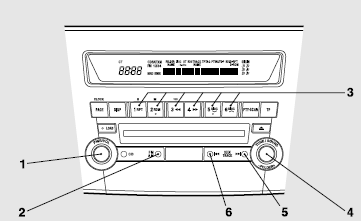
1- PWR (On-Off) switch
2- AM/FM (FM/MW/LW selection) button
3- Memory select buttons
4- TUNE switch
5- SEEK (Up-seek) button
6- SEEK (Down-seek) button
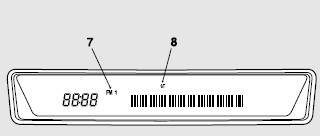
7- FM (FM1/FM2/FM3) indicator
8- ST (Stereo) indicator
See also:
Fuel selection
For the petrol-powered vehicles with turbocharger, your engine is designed to
provide satisfactory performance by using unleaded petrol octane number 98 RON or
higher. In order to maintain engin ...
To reduce the set speed
There are 2 ways to reduce the set speed.
Auto–speed control lever
Pull down and hold the auto–speed control lever until you reach the lower speed
you want. Release the lever when the desire ...
Headlamp levelling switch
The angle of the headlamp beam varies depending on the load carried by the vehicle.
The headlamp levelling switch can be used to adjust the headlamp illumination
distance (when the lower beam is il ...