
Front room & map lamps
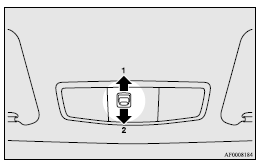
1 (DOOR) - The lamp illuminates when a door or the rear hatch is opened. It goes off about 15 seconds after the door or rear hatch is closed. However, the lamp goes off immediately in the following cases: ► The ignition switch is turned to the “ON” position.
► All the doors and the rear hatch are locked using the central door lock function.
► If the vehicle is equipped with the keyless entry system, when the remote control switch of the keyless entry system is used to lock the vehicle.
► If the vehicle is equipped with the keyless operation system, when the remote control switch of the keyless operation system or the keyless operation function is used to lock the vehicle.
 Note
Note
► When the key was used to start the engine, if the key is removed while the doors and rear hatch are closed, the lamp is illuminated and after about 15 seconds it goes off.
► When the keyless operation function was used to start the engine, if the ignition switch is turned to the “LOCK” position while the doors and rear hatch are closed, the lamp illuminates and after about 15 seconds it goes off.
► The time until the lamp goes off can be adjusted.
For details, please consult a MITSUBISHI MOTORS Authorized Service Point.
If the vehicle is equipped with the MITSUBISHI Multi-Communication System (MMCS), adjustment can be made using screen operations. Refer to the separate owner’s manual for details.
2 (OFF) - The lamp goes off.
See also:
Rear-view camera
The rear-view camera is a system that shows the view behind the vehicle on a
screen in the centre panel.
CAUTION
• The rear-view camera is an assistance system that enables the driver to
chec ...
Engine compartment fuse location table
1: Except for petrol-powered vehicles equipped with turbocharger
2: Petrol-powered vehicles with turbocharger
3: Fusible link
1: Except for petrol-powered vehicles equipped with turbochar ...
Economical driving
For economical driving, there are some technical requirements that have to be
met. The prerequisite for low fuel consumption is a properly adjusted engine. In
order to achieve longer life of the v ...