
Removing and installing the battery upper cover (Petrol-powered vehicles
equipped with turbocharger)
 Warning
► Turn the ignition key to the “LOCK” position on the vehicle. Make sure that your clothes cannot be caught by the fan or drive belt. Personal injury could result.
To remove
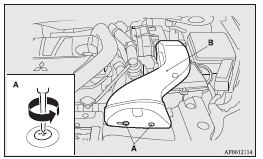
1. Remove the clips (A), and then remove the air duct (B).
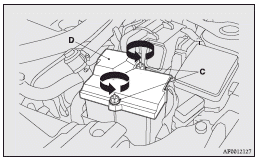
2. Turn the plastic nuts (C) anticlockwise, and then remove the battery upper cover (D).
 Note
Note
► Be careful not to lose the removed plastic nuts.
To install
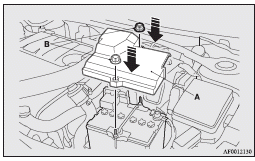
1. Install the battery upper cover (A) onto the battery, and then push the plastic nuts (B) in the direction shown by the arrows to secure the cover.
Note
► Be sure to install the plastic nuts in the correct direction.
► Make sure that the battery upper cover is installed securely.
2. To install the air duct, perform the removal steps in reverse.
 Caution
► Be sure to install the battery upper cover.
Otherwise, the battery electrolyte may spill and cause a malfunction.
► When installing the battery upper cover, plastic nuts, and air duct, do not touch
the cooling fan or other moving parts in the engine compartment. Be especially careful
that the cables, your clothing or hair, etc., do not get caught in the cooling fan
or other moving parts.
See also:
Alarm activation
The turn-signal lamps blink and the siren sounds for approximately 30 seconds.
Refer to “Alarm activation”.
Note
► The alarm will resume if unlawful actions are taken again, even if the ...
Engine overheating
If the water temperature gauge indication remains in the overheating zone for
a long time, the engine may be overheating. If this occurs, take the following corrective
measures :
1. Stop the vehi ...
Tools and jack
Storage
The tools and jack are stowed in the luggage compartment.
The storage location of the tools and jack should be remembered in case of an
emergency.
1- Tools
2- Jack
Tools
1- Tool ca ...