
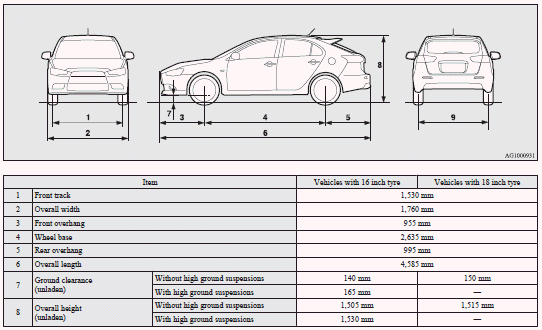
Vehicle dimensions

See also:
Roof drip moulding
When installing the roof carrier, remove the roof drip moulding caps.
1. Open the cover (A) and remove the screws using a Philips screwdriver. 2.
Remove the caps by sliding them.
After removal o ...
ACD (Active centre differential system) control mode display screen
The ACD operation status is displayed.
Refer to “ACD control mode switch”. ...
Using the MIVEC engine
The MIVEC engine automatically controls valve timing in accordance with driving
conditions for maximum engine performance.
Note
► To protect the engine, the high-speed mode may not be selec ...