
Electrical system
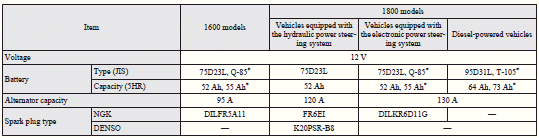
Vehicles equipped with Auto Stop & Go (AS&G) system
 Note
Note
► For vehicles equipped with the Auto Stop & Go (AS&G) system, contact a MITSUBISHI MOTORS Authorized Service Point when replacing the battery.

: Optional equipment
See also:
To play tracks from a Bluetooth® device (vehicles with Bluetooth® 2.0 interface)
You can wirelessly connect a digital audio player or cellular phone supporting
Bluetooth® to listen to the tracks on the connected device.
Refer to “Bluetooth® 2.0 interface” for the connecti ...
Inspection and maintenance following rough road operation
After operating the vehicle in rough road conditions, be sure to perform the
following inspection and maintenance procedures:
• Check that the vehicle has not been damaged by rocks, gravel, etc.
...
Towing bar mounting specifications
See the following table for fixing points (A) for the towing bar.
1: Vehicles equipped with 16 inch tyres that are without high ground suspensions
2: Vehicles equipped with 18 inchtyres
3: Vehi ...