
Outside (Rear)
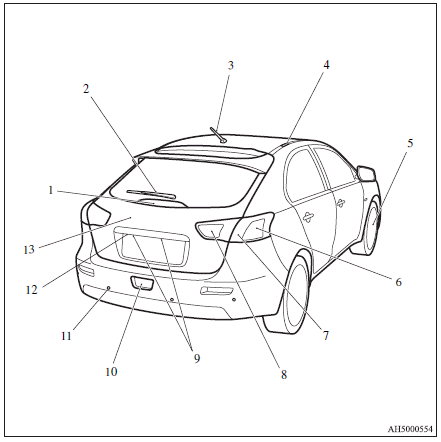
1. High-mounted stop lamp
2. Rear window wiper
3. Antenna p.
4. Roof carrier mounting brackets
5. Tyre inflation pressures
Changing tyres
Tyre rotation
Wheel covers
Tyre chains
6. Rear turn-signal lamps
7. Stop and tail lamps
8. Reversing lamps
9. Licence plate lamps
10. Rear fog lamp
11. Corner and back sensor locations
12. Rear-view camera
13. Rear hatch
See also:
Ventilators
1- Centre ventilators
2- Side ventilators
Note
► Do not place beverages on top of the instrument panel. If they splash into
the air conditioning ventilators, they could damage the system ...
Loading a roof carrier
Caution
► Use a roof carrier that properly fits your vehicle.
Do not load luggage directly onto the roof.
For installation, refer to the instruction manual accompanying the roof carrier.
N ...
Ignition switch
[For vehicles equipped with keyless operation system]
For information on operations for vehicles equipped with the keyless operation
system, refer to “Keyless operation system: Ignition switch” ...