
Antenna
To remove
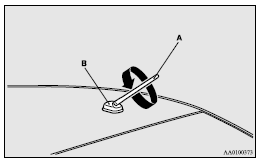
Turn the pole (A) anticlockwise.
To install
Screw the pole (A) clockwise into the base (B) until it is securely retained.
 Note
Note
► Be sure to remove the roof antenna in the following cases:
• When using an automatic car wash.
• When placing a car cover over the vehicle.
• When driving into a structure that has a low ceiling.
See also:
Capacities
...
Waxing
Waxing the vehicle will help prevent the adherence of dust and road chemicals
to the paintwork. Apply a wax solution after washing the vehicle, or at least once
every three months to assist displa ...
Disconnection and connection
To disconnect the battery cable, stop the engine, first disconnect the negative
(-) terminal and then the positive (+) terminal.
When connecting the battery, first connect the positive (+) terminal ...