
Automatic mode
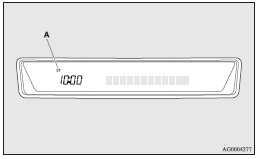
The automatic adjustment mode can set the local time automatically by using the signal from local RDS stations. In this mode, CT (A) is shown in the display. Refer to “Radio data system (RDS)” on pages 5-22, 5-36.
See also:
Seat
1-Front seat
• To adjust forward or backward ®
• To recline the seatback ®
• To adjust seat height (driver’s seat only) ®
• Armrest* ®
• Heated seats* ®
2-Rear seat
• Armre ...
Fuel gauge
The fuel gauge indicates the fuel level in the fuel tank irrespective of the
ignition switch position.
0- Empty 1- Full
CAUTION
Do not drive with an extremely low fuel level; running out of fue ...
Cargo loads precautions
Caution
► Do not load cargo or luggage higher than the top of the seatback. Be sure
that your cargo or luggage cannot move once your vehicle is moving.
Having the driver’s vision blocked, ...