
Reversing lamps
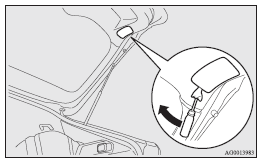
1. Insert a straight blade (or minus) screwdriver with the end covered with a cloth or other object into the cut out area of the cover and pry gently to remove the cover.
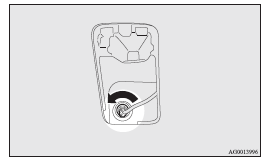
2. Remove the socket and bulb assembly by turning it anticlockwise.
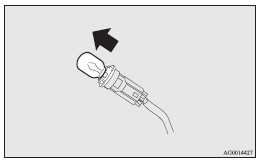
3. Remove the bulb by pulling it out.
4. To install the bulb, perform the removal steps in reverse.
 Note
Note
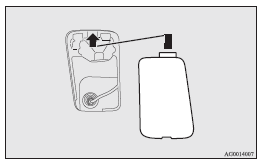
► When installing the lid, align the tab on the lid with the hole on the vehicle side.
See also:
2013 Mitsubishi ASX Review
The Mitsubishi Outlander Sport was introduced for the 2011 model year, and
despite a harsh review here on Cars.com, it's sold well. Though it shares the
Outlander name, the Sport is smaller than t ...
To unlock
Press the UNLOCK switch (2). All the doors and the rear hatch will be unlocked.
If the front room lamp switch (if so equipped) is in the “DOOR” position or the
rear room lamp switch (except fo ...
Other interrupt displays (when the ignition switch is “ON”)
The operation status of each system is displayed on the information screen. Refer
to the appropriate page for the system for further details.
This informs you that a periodic inspection is due.
...