
Vehicles with CVT
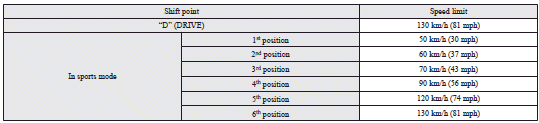
See also:
Child-protection rear doors
1- Lock
2- Unlock
Child protection helps prevent the rear doors from being opened accidentally
from the inside.
If the lever is set to the locked position, the rear door cannot be opened using ...
Central door locks
Locking or unlocking driver’s door with the key or operating the central door
lock switch makes all doors and the boot lid (or tailgate) simultaneously locked
or unlocked.
NOTE
Each of the rea ...
Starting the engine (petrol-powered vehicles)
The starting procedure is as follows: 1. Fasten the seat belt.
2. Make sure the parking brake is applied.
3. Depress and hold the brake pedal.
4. Fully depress the clutch pedal. (M/T)
Note
υ ...