
How to change a tyre
Before changing a tyre, first stop your vehicle in a safe, flat location.
1. Park the vehicle on level and stable ground, free of loose pebbles, etc.
2. Set the parking brake firmly.
3. On vehicles with M/T, turn the ignition switch to the “LOCK” position, move the gearshift lever to the “R” (Reverse) position.
On vehicles with CVT or Twin Clutch SST, move the selector lever (CVT) or gearshift lever (Twin Clutch SST) to the “P” (PARK) position, turn the ignition switch to the “LOCK” position.
4. Turn on the hazard warning flashers and set up a warning triangle, flashing signal lamp, etc., at an adequate distance from the vehicle, and have all your passengers leave the vehicle.
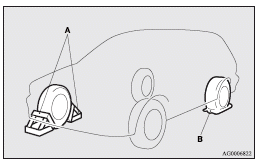
5. To prevent the vehicle from rolling when it is raised on the jack, place chocks or blocks (A) at the tyre that is diagonally opposite from the tyre (B) you are changing.
 Warning
► Be sure to apply chocks or blocks to the correct tyre when jacking up the
vehicle.
If the vehicle moves while jacked up, the jack could slip out of position, leading
to an accident.
 Note
Note
► The chocks shown in the illustration do not come with your vehicle. It is recommended
that you keep one in the vehicle for use if needed.
► If chocks or blocks are not available, use stones or any other objects that are
large enough to hold the wheel in position.
6. Get the jack bar and wheel nut wrench ready.
Refer to “Tools and jack”.
See also:
Range of view of rear-view camera
The range of view of the rear-view camera is limited to the area shown in the
illustrations. It cannot show both sides and the lower part of the rear bumper,
etc.
When reversing, be sure to visua ...
Keyless entry system
Press the remote control switch, and all doors and the rear hatch will be locked
or unlocked as desired.
It is also possible to operate the outside rear-view mirrors.
1- LOCK switch
2- UNLOCK s ...
Manual reset mode
► When the average fuel consumption is being displayed, if you hold down the
multi-information meter switch, the average fuel consumption displayed at that time
is reset. ...