
Manual shift
Using the gearshift lever (A) or the shift paddles (B), shifting can be performed manually.
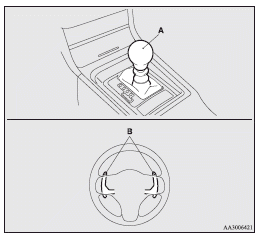
Shifting can be performed even while the accelerator pedal is depressed.
This allows the driver to enjoy sporty driving, such as quick cornering, by nimbly downshifting to reduce vehicle speed just before entering a curve.
 Caution
► When manually shifting while the vehicle is being driven, select the correct
shift position to control the engine speed so that the tachometer indicator does
not enter the red zone.
► Sudden engine braking and rapid acceleration can cause the vehicle to skid. Shift
down according to road conditions and vehicle speed.
► If both the left and right shift paddles are operated at the same time, the transmission
may not change gears.
 Note
Note
► Only the forward gears 1 to 6 can be selected.
To reverse or park, place the gearshift lever in the “R” (REVERSE) or “P” (PARK)
position.
► During manual shifting, downshifting will be performed automatically when the
vehicle slows down and the transmission will downshift to 1st gear before the vehicle
stops.
► If the gearshift lever or shift paddles are operated repeatedly, the transmission
will also shift repeatedly.
► In order to ensure driving performance, upshifting may not occur depending on
the vehicle speed even if the gearshift lever or shift paddles are operated. In
addition, in order to prevent excessive engine speed, the buzzer sounds and downshifting
may not occur depending on the vehicle speed even if the gearshift lever or shift
paddles are operated.
► When driving in an aggressive manner involving high engine rpm, sudden acceleration
and/or deceleration, the Twin Clutch SST could take longer to shift due to higher
oil temperatures.
See also:
To install
1. Remove any foreign material in or around the connectors and ensure the vehicle
seat belt is in its normal storage position.
2. Push the child restraint system’s connectors (A) into the slit (B ...
Headlamps
NOTE
• When entering a country in which vehicles are driven on the opposite side of
the road to the country in which your vehicles is supplied, necessary measures have
to be taken to avoid daz ...
Error codes (iPod)
Vehicles with Link System
If an error code (1) appears in the display, take action in accordance with the
table below.
...